Game interface design study
Deckbuilder and card game UI references
Card game UI must make individual cards readable while showing how a hand changes the larger game state. Slay the Spire and Balatro organize those tasks differently. Compare the selected card, the persistent resource displays and the grouping of cards that have different roles.
Artstyle visual analysis of the screenshots below. These references describe appearance, not a verified account of how the original assets were produced.
Explore card game interface referencesWhat defines this look
Selected versus available
The card being examined needs a clear focus state without hiding the rest of the hand. Enlarging or raising it should preserve a sense of where it came from.
Persistent arithmetic
Resources, costs and scores should remain in stable positions. Players need to connect a proposed action with its effect on those numbers.
Groups with distinct roles
Separate hand, persistent modifiers, played cards and targets. Spatial grouping can reduce the amount of labeling required, provided it stays consistent.
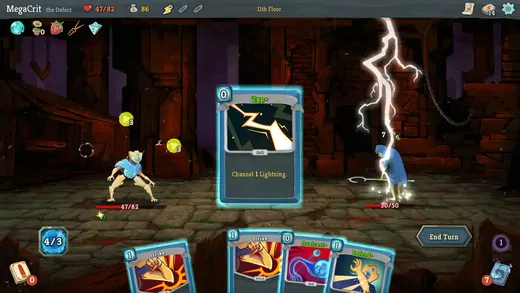
A card rises into focus
Slay the Spire
Slay the Spire lifts the selected card above the hand, making its illustration and rules more prominent while the battlefield remains visible.
What to studyCompare the selected card’s size with the cards behind it.
Explore these references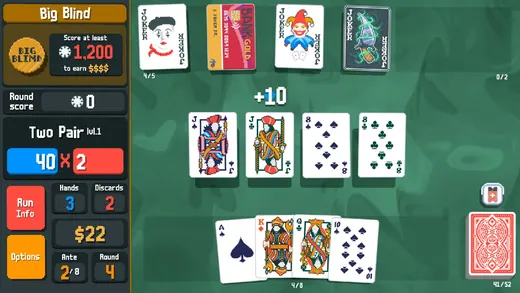
A table with stable arithmetic
Balatro
Balatro keeps large score and multiplier blocks at the left, with playing cards and jokers in separate rows. The layout distinguishes calculation from card groups.
What to studyIdentify the persistent regions before following a particular hand.
Explore these referencesWhat to avoid
Readable card art does not guarantee readable rules. Test the longest text, smallest supported display and states with many simultaneous modifiers.
Should a card always show all of its rules?
Not necessarily at every scale, but the player needs a reliable way to inspect them before committing. Compare the compact hand state with an expanded inspection state.
Build your reference sheet.
Collect a resting hand, a selected card and a scoring state. Annotate which numbers remain visible throughout a decision.
Start a free lookbookYour free lookbook includes 20 references and sharing.
Visual analysis by Artstyle. Screenshots belong to their respective rights holders and are provided as references, not licensed production assets. Source links appear with each image.
Related visual studies
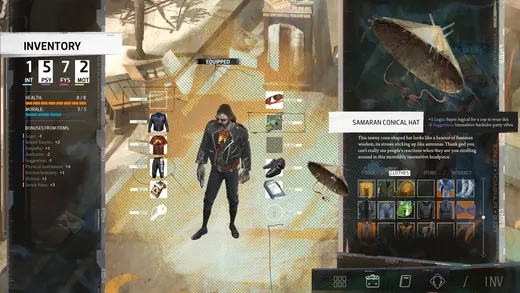
RPG inventory UI design references
RPG inventory UI must distinguish what a character owns, what they have equipped and what will change when an item is selected.

Game dialogue boxes and choice UI
Game dialogue UI coordinates the speaker, the words and the player’s next action.
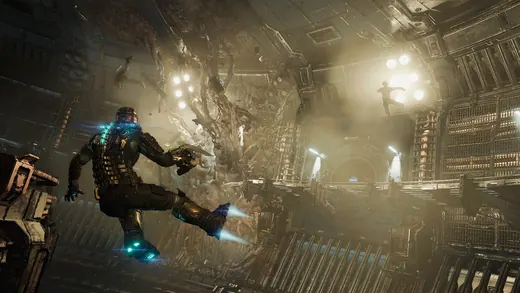
Diegetic game UI and in-world HUDs
Diegetic UI presents information as part of the game world rather than only as a separate screen overlay.